
Web Platforms vs SaaS Platforms: What Businesses Really Need in 2026
A comprehensive comparison to help you make the right technology decision for your business.
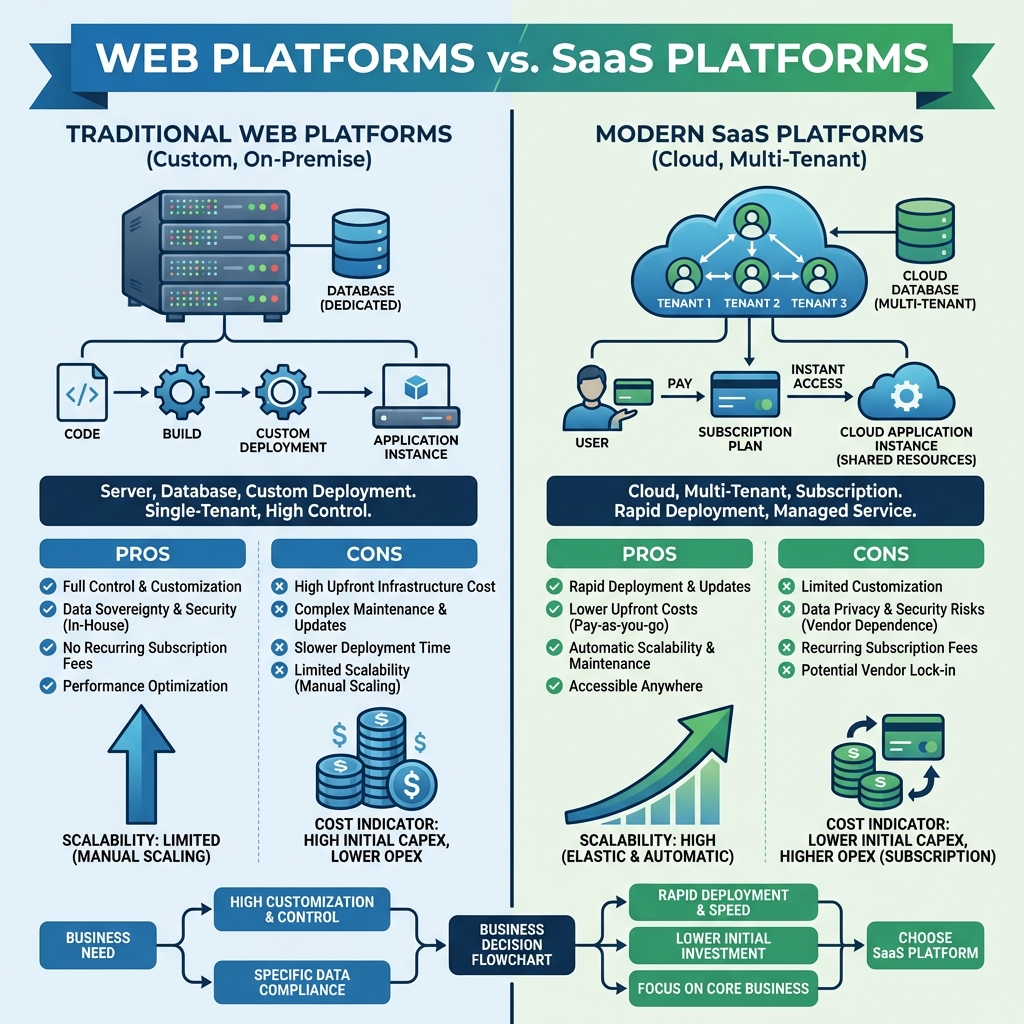
In 2026, businesses face a critical decision when investing in software solutions: should you build a custom web platform or adopt a SaaS solution? This choice significantly impacts your costs, scalability, control, and long-term success.
This comprehensive guide breaks down the fundamental differences between web platforms and SaaS platforms, helping you understand which approach aligns with your business needs, budget, and growth trajectory.
Understanding the Core Differences
What is a Web Platform?
A web platform (also called custom web application) is software built specifically for your business, hosted on your own infrastructure or dedicated servers. Think of it as a tailored suit—designed exactly for your needs.
Characteristics:
- Custom-built for your specific requirements
- Hosted on your own servers or dedicated cloud infrastructure
- Full control over features, data, and customization
- One-time development cost plus ongoing maintenance
- Single-tenant architecture (your data is isolated)
What is a SaaS Platform?
A SaaS (Software-as-a-Service) platform is ready-made software accessed via the internet on a subscription basis. Think of it as renting an apartment—move in ready, but with some limitations.
Characteristics:
- Pre-built software with standard features
- Hosted by the vendor on shared infrastructure
- Limited customization (within vendor's framework)
- Monthly/annual subscription pricing
- Multi-tenant architecture (shared infrastructure)
- Automatic updates and maintenance
Detailed Comparison: Web vs SaaS Platforms
| Factor | Web Platform (Custom) | SaaS Platform |
|---|---|---|
| Initial Cost | $50,000 - $500,000+ | $0 - $5,000 setup |
| Monthly Cost | $2,000 - $10,000 (hosting + maintenance) | $50 - $5,000 (subscription) |
| Time to Launch | 3-12 months | Days to weeks |
| Customization | 100% - Build anything | 10-30% - Limited to vendor options |
| Scalability | Manual scaling required | Automatic scaling |
| Data Ownership | Full ownership | Vendor-dependent |
| Updates | Manual (you control timing) | Automatic (vendor-controlled) |
| Integration | Custom APIs, full control | Pre-built integrations only |
| Security Control | Full control | Vendor-managed |
| Vendor Lock-in | None | High |
When to Choose a Custom Web Platform
Ideal Scenarios:
- Unique Business Processes
If your business has proprietary workflows that provide competitive advantage, a custom platform ensures you're not forcing your processes into generic software.
Example: A logistics company with unique routing algorithms that differentiate them from competitors.
- Complex Integration Requirements
When you need deep integration with legacy systems, proprietary databases, or specialized hardware that SaaS platforms don't support.
Example: Manufacturing company integrating with custom machinery and IoT sensors.
- Strict Data Compliance
Industries with stringent data residency, security, or compliance requirements (healthcare, finance, government).
Example: Healthcare provider needing HIPAA-compliant system with data stored in specific geographic regions.
- Long-term Cost Efficiency
For large organizations with 100+ users, custom platforms often become more cost-effective than SaaS subscriptions over 3-5 years.
Calculation: $200K custom platform vs $2,000/month SaaS = break-even at 100 months (8.3 years)
- Competitive Differentiation
When software capabilities are core to your competitive advantage, custom development ensures unique features competitors can't replicate.
Example: E-commerce platform with proprietary recommendation engine.
- Full Control Requirements
Need complete control over features, updates, data, and infrastructure without vendor dependencies.
Advantages of Custom Web Platforms:
- ✓ Complete customization to exact requirements
- ✓ Full data ownership and control
- ✓ No vendor lock-in
- ✓ Unlimited scalability (with proper architecture)
- ✓ Competitive advantage through unique features
- ✓ Better long-term ROI for large organizations
- ✓ Complete security control
- ✓ Custom integrations with any system
Disadvantages of Custom Web Platforms:
- ✗ High upfront investment ($50K-$500K+)
- ✗ Longer time to market (3-12 months)
- ✗ Requires ongoing maintenance and updates
- ✗ Need technical team or development partner
- ✗ Infrastructure management responsibility
- ✗ Higher risk if requirements change
When to Choose a SaaS Platform
Ideal Scenarios:
- Standard Business Processes
If your needs align with common industry practices, SaaS platforms offer proven solutions without custom development.
Example: Email marketing, CRM, project management, accounting.
- Quick Time to Market
When you need to launch quickly (days/weeks) without waiting for custom development.
Example: Startup needing to validate business model quickly.
- Limited Budget
Small businesses or startups with limited capital can start with low monthly subscriptions instead of large upfront investments.
Example: $99/month vs $100,000 custom development.
- Non-Technical Team
Organizations without technical expertise benefit from vendor-managed infrastructure, updates, and support.
- Scalable User Base
SaaS platforms automatically scale with your user growth without infrastructure management.
- Focus on Core Business
When software is a tool, not your competitive advantage, SaaS lets you focus on your core business.
Example: Restaurant using reservation software—it's necessary but not their differentiator.
Advantages of SaaS Platforms:
- ✓ Low upfront cost (pay-as-you-go)
- ✓ Instant deployment (days to weeks)
- ✓ Automatic updates and maintenance
- ✓ Proven, tested software
- ✓ Automatic scalability
- ✓ No technical team required
- ✓ Vendor support included
- ✓ Regular feature additions
- ✓ Lower risk (can switch if not satisfied)
Disadvantages of SaaS Platforms:
- ✗ Limited customization options
- ✗ Vendor lock-in (data migration challenges)
- ✗ Ongoing subscription costs (can exceed custom over time)
- ✗ Less control over features and updates
- ✗ Potential data security concerns
- ✗ Dependency on vendor's business continuity
- ✗ May include features you don't need (paying for bloat)
- ✗ Integration limitations
Cost Analysis: 5-Year Comparison
Scenario: 50-User Business Application
Custom Web Platform:
- Year 1: $150,000 (development) + $30,000 (hosting/maintenance) = $180,000
- Years 2-5: $40,000/year (hosting, maintenance, updates) = $160,000
- 5-Year Total: $340,000
- Per User/Month: $113
SaaS Platform ($50/user/month):
- Monthly: 50 users × $50 = $2,500
- Annual: $30,000
- 5-Year Total: $150,000
- Per User/Month: $50
Scenario: 500-User Enterprise Application
Custom Web Platform:
- Year 1: $400,000 (development) + $60,000 (hosting/maintenance) = $460,000
- Years 2-5: $80,000/year = $320,000
- 5-Year Total: $780,000
- Per User/Month: $260
SaaS Platform ($75/user/month):
- Monthly: 500 users × $75 = $37,500
- Annual: $450,000
- 5-Year Total: $2,250,000
- Per User/Month: $75
Hybrid Approach: Best of Both Worlds
Many successful businesses use a hybrid strategy:
Start with SaaS, Migrate to Custom
- Phase 1 (Year 1): Use SaaS to validate business model and gather requirements
- Phase 2 (Year 2): Once proven, develop custom platform with learnings from SaaS usage
- Phase 3 (Year 3): Migrate to custom platform, maintain SaaS for non-critical functions
Benefits:
- Quick start with SaaS
- Validate before major investment
- Build custom solution based on real usage data
- Reduce risk of building wrong features
SaaS for Commodities, Custom for Differentiation
Use SaaS for standard functions, custom for competitive advantages:
- SaaS: Email, CRM, accounting, HR management
- Custom: Core business logic, unique workflows, proprietary algorithms
Example: E-commerce company uses Shopify for storefront (SaaS) but builds custom inventory management and recommendation engine (custom).
Decision Framework: Which Should You Choose?
Choose Custom Web Platform if:
- ✓ You have unique business processes that provide competitive advantage
- ✓ Budget allows for $100K+ upfront investment
- ✓ You have 100+ users (better long-term ROI)
- ✓ Strict compliance or data residency requirements
- ✓ Need deep integration with legacy systems
- ✓ Software is core to your competitive strategy
- ✓ Can wait 3-6 months for development
- ✓ Have technical team or reliable development partner
Choose SaaS Platform if:
- ✓ Your needs align with standard industry practices
- ✓ Limited budget (<$50K available)
- ✓ Need to launch quickly (weeks, not months)
- ✓ Small team (<100 users)
- ✓ No technical expertise in-house
- ✓ Software is a tool, not your differentiator
- ✓ Want to avoid infrastructure management
- ✓ Prefer predictable monthly costs
Industry-Specific Recommendations
E-commerce
Recommendation: Start with SaaS (Shopify, WooCommerce), migrate to custom when you reach $5M+ revenue or need unique features.
Healthcare
Recommendation: Custom platform due to HIPAA compliance, data sensitivity, and unique workflows.
Financial Services
Recommendation: Custom platform for core systems, SaaS for supporting functions (CRM, marketing).
Professional Services
Recommendation: SaaS platforms (project management, time tracking) unless you have unique service delivery methods.
Manufacturing
Recommendation: Custom platform for production management, SaaS for office functions.
Startups
Recommendation: Start with SaaS to validate, build custom once you have product-market fit and funding.
Making the Transition
From SaaS to Custom Platform
If you're outgrowing SaaS, plan your migration carefully:
- Document Current Workflows: Map all processes and features you use
- Identify Pain Points: What limitations are you hitting?
- Prioritize Features: What must be in v1 of custom platform?
- Plan Data Migration: How will you move existing data?
- Parallel Running: Run both systems during transition
- User Training: Prepare team for new system
- Gradual Cutover: Migrate in phases, not all at once
From Custom to SaaS
If custom platform isn't working, consider:
- Evaluate ROI: Is custom platform delivering value?
- Research Alternatives: Can modern SaaS meet your needs?
- Calculate Total Cost: Include maintenance, updates, infrastructure
- Test SaaS Options: Run pilots before committing
- Plan Migration: Data export, user training, cutover strategy
Future Trends: The Convergence
The line between web platforms and SaaS is blurring:
- Composable SaaS: Mix and match components from different vendors
- Low-Code Platforms: Build custom features on SaaS foundations
- API-First SaaS: Deep customization through APIs
- White-Label SaaS: SaaS platforms you can brand and customize
- Embedded SaaS: Integrate SaaS components into custom platforms
These trends enable businesses to get benefits of both approaches: speed and reliability of SaaS with customization of custom platforms.
Conclusion: Choose Based on Your Unique Needs
There's no universal answer to "web platform vs SaaS"—the right choice depends on your specific situation:
- Budget: Can you afford $100K+ upfront?
- Timeline: Can you wait 3-6 months?
- Scale: How many users will you have?
- Uniqueness: How unique are your requirements?
- Control: How important is full control?
- Expertise: Do you have technical capabilities?
For most small businesses and startups, SaaS platforms offer the best starting point—low cost, quick deployment, and proven functionality. As you grow and your needs become more specialized, custom web platforms often become more attractive, offering better ROI and competitive advantages.
The key is to be strategic: start with what makes sense today, but plan for tomorrow. Whether you choose SaaS, custom, or a hybrid approach, ensure your decision aligns with your long-term business strategy.
Frequently Asked Questions
Can I start with SaaS and switch to custom later?
Yes, this is a common and recommended approach. Use SaaS to validate your business model, then build custom when you have proven demand and budget. Plan for data migration from the start.
How much does it cost to maintain a custom web platform?
Typically 15-25% of initial development cost annually. For a $200K platform, expect $30K-$50K/year for hosting, updates, bug fixes, and enhancements.
Is SaaS secure enough for sensitive data?
Reputable SaaS providers invest heavily in security (often more than individual companies can). However, for highly sensitive data or strict compliance requirements, custom platforms with dedicated infrastructure may be necessary.
What's the break-even point between SaaS and custom?
It varies, but typically 3-5 years for mid-sized businesses (50-200 users) and 1-2 years for enterprises (500+ users). Calculate based on your specific costs and user count.
Can I customize a SaaS platform?
Most SaaS platforms offer some customization (branding, workflows, fields) but are limited compared to custom development. Some modern SaaS platforms offer extensive APIs and low-code tools for deeper customization.